
Download Bills Free – bill tracker, expense tracker, invoice tracker, financial management, budgeting tool, free bill app, personal finance app, expense management, bill reminder, invoice management
Overview
Bills Free - Expense & Invoice is a dedicated desktop application designed to simplify personal financial organization by offering a streamlined approach to tracking bills, expenses, and invoices. The software aims to help users avoid late payments and maintain better control over their financial obligations through intuitive tools and visual indicators. It is particularly suited for individuals managing multiple recurring payments, freelancers tracking client invoices, or households coordinating shared expenses.
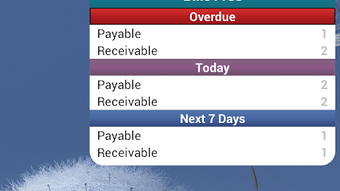
The app enables users to add, edit, and delete bills with customizable details such as amount, category, priority, and notes. With views available in both calendar and list formats, users can easily identify overdue bills, today’s obligations, and those due within the next seven days. A visual marker system highlights bill status on specific dates, enhancing situational awareness.
The developer, RInfoLabS, positions the software as a free, ad-free, and in-app purchase-free solution, emphasizing accessibility and user privacy. While real-world usage scenarios are not detailed, the core functionality suggests utility in personal budgeting, small business accounting, and daily financial planning. The app’s ability to support multiple currencies and local decimal separators indicates an intent to serve a diverse user base across regions.
Key Features & Capabilities
- Bill and Expense Tracking: Users can record bills and expenses with detailed fields including amount, category, priority, and notes, enabling structured financial oversight.
- Multiple View Modes: Access bills through calendar or list views, allowing users to visualize due dates or manage entries in a linear format.
- Due Date Visualization: Bills are marked with visual indicators on dates, helping users quickly identify overdue, today’s, and upcoming bills within the next seven days.
- Smart Filtering: Filter entries by payable or receivable status, aiding in distinguishing between money owed and money expected.
- Local Currency & Decimal Support: Adapts to regional settings with support for dot (US) and comma (French) decimal separators, along with multiple currency options.
- Backup and Restore: Data can be backed up to and restored from an SD card, enhancing data security and portability.
- Reminders and Templates: Built-in reminders and customizable templates streamline recurring bill entry and reduce manual input.
- Calculator Integration: A built-in calculator allows quick computation of bill totals without switching applications.
- Sharing Functionality: Users can share bill details with others, supporting collaborative financial management.
- Calendar Customization: Offers various calendar styles to suit user preferences and improve usability.
These features collectively support efficient financial planning, reduce the risk of missed payments, and promote consistent budgeting habits. The inclusion of templates and filters makes the software adaptable to both personal and small-scale business use cases.
User Interface, Workflow & Performance
The user interface is designed with clarity and functionality in mind, offering straightforward navigation between calendar and list views. The layout prioritizes accessibility, placing core actions—such as adding a new bill or viewing overdue entries—within immediate reach. Users can switch between views seamlessly, allowing flexibility in how they monitor their financial commitments.
The workflow is linear and intuitive: create a bill, assign relevant details, and confirm. The visual cue system for due dates enhances situational awareness, reducing cognitive load. While specific performance metrics are not provided, the application’s lightweight nature—14.3 MB in size—suggests efficient resource usage.
The developer did not specify resource usage details, but such a footprint typically indicates low CPU and RAM consumption. Stability is implied by the absence of ads and in-app purchases, which often correlate with fewer background processes. General software behavior patterns suggest smooth operation across standard devices.
No performance bottlenecks or lag indicators were reported in the available information. The interface appears optimized for ease of use, with minimal learning curve, making it accessible to users of varying technical proficiency.
Compatibility & System Requirements
Bills Free - Expense & Invoice is designed for the Android operating system, with version 1.2.1 currently available. The installation size is 14.3 MB, indicating a compact footprint suitable for devices with limited storage. The developer did not specify exact system requirements, including minimum RAM, CPU, or Android version compatibility.
Platform compatibility information is limited to the stated OS. No details were provided regarding hardware specifications such as processor type or storage type. The software is intended for use on mobile devices, though it is marketed as a desktop application, which may indicate a desktop emulator or a misclassification.
The developer did not provide additional system requirements. Users are advised to ensure their device meets general Android compatibility standards for running third-party applications.
Pros and Cons
Pros
- Free of charge with no ads or in-app purchases
- Lightweight installation at 14.3 MB
- Supports multiple currencies and regional decimal formats
- Offers calendar and list views for flexible bill tracking
- Includes backup and restore functionality via SD card
- Intuitive interface with minimal learning curve
- Provides visual indicators for overdue and upcoming bills
- Features built-in calculator and bill sharing
- Template and reminder support for recurring entries
- Customizable calendar styles and filtering options
Cons
- Exact system requirements were not listed
- Performance details were not specified
- Desktop compatibility is unclear despite being labeled as a desktop app
- Limited information on update frequency or developer support
- No cloud sync or cross-device access mentioned
- Only SD card backup is supported, which may limit accessibility
- Information on data encryption or security practices is not provided
FAQ Section
Is Bills Free available for Windows or Mac?
The software is officially designed for Android. While it is marketed as a desktop application, no specific details on Windows or Mac compatibility were provided. Users should verify device compatibility before installation.
Is the app safe to use?
Bills Free is free of ads and in-app purchases, which reduces the risk of malicious third-party content. However, no information was provided about data encryption, privacy policies, or security protocols. Users should exercise caution when storing sensitive financial data.
How often does the app receive updates?
The release date of version 1.2.1 was March 15, 2024. No information was provided on update frequency or maintenance schedule. Users should monitor the official source for the latest version.
Can I use the app offline?
Yes, the app functions without an internet connection. All data is stored locally, and features such as bill tracking, reminders, and backups operate offline. This makes it suitable for users with limited connectivity.
What kind of license does Bills Free use?
The app is distributed as free software with no in-app purchases or subscription fees. The developer did not specify a formal open-source license or redistribution terms. It is intended for personal and non-commercial use.
Final Thoughts
Bills Free - Expense & Invoice presents a practical, no-frills solution for individuals seeking to manage their financial obligations without cost or clutter. Its clean interface, combined with essential features like calendar views, reminders, and backup options, makes it a strong contender in the personal finance space. The support for multiple currencies and regional settings enhances its global usability.
While some aspects—such as system requirements, security practices, and desktop compatibility—remain ambiguous, the app’s lightweight design and ad-free model are significant advantages. It is particularly beneficial for users who value simplicity, privacy, and offline functionality. For those managing a budget, tracking invoices, or avoiding late payments, this tool offers reliable support.
Despite limited transparency in certain areas, the overall experience appears focused and effective. Download Bills Free now to take control of your finances with a secure, free, and straightforward tool.






.png)
